Screen readers can't look at pixels, so desktops publish a structured description of every app's UI for them: this is a window, it has a toolbar, the toolbar has a button called "Reload", and here's where it is. On Linux that description is AT-SPI (Assistive Technology Service Provider Interface), and apps publish it on a dedicated D-Bus bus.
Anything that can talk to that bus can read the tree and trigger actions, and an agent can use the same thing a
screen reader does. computer_use/accessibility.py wraps it.
What an element looks like
json{"path": "4/0/0/0/5/2/0/1/3/6", "role": "link", "name": "Learn more",
 "bounds": {"x": 603, "y": 434, "width": 74, "height": 22}, "text": "Learn more", "states": []}
| Field | Meaning |
|---|---|
role |
what kind of thing: button, link, entry (a text field), check box, frame, document web… |
name |
its accessible name: a button's label, a link's text, a field's label |
path |
how to find it again: child indexes from the desktop down (app 4, its child 0, that one's child 0…) |
bounds |
where it is, in screenshot pixels, like every other coordinate in the API |
states |
focused, checked, selected, editable, disabled |
The four operations:
| Operation | Does |
|---|---|
tree |
the visible UI as nested elements (max_depth, capped at 500 elements) |
find |
a flat list of elements by exact role and/or name substring |
press |
runs the element's own action (click, press, activate, or jump for links) |
set_text |
replaces a text field's contents |
Turning it on
Apps only publish a tree when something asks for one, because building it costs memory and CPU. Omarchy doesn't
turn it on by default, so omarchy-setup.sh does, once per toolkit:
| Toolkit | Switch | Where the setup script puts it |
|---|---|---|
| GTK | toolkit-accessibility setting |
gsettings set org.gnome.desktop.interface toolkit-accessibility true |
| Qt | QT_ACCESSIBILITY=1 |
~/.config/environment.d/60-canine-accessibility.conf (the session's environment) |
| Chromium / Electron | --force-renderer-accessibility |
appended to ~/.config/chromium-flags.conf |
Python reaches AT-SPI through PyGObject: from gi.repository import Atspi. PyGObject is the package's only
dependency, and Omarchy already has it installed.
Finding and pressing
find walks the tree and skips anything that isn't SHOWING (hidden tabs, collapsed menus):
pythondef find(role=None, name=None, app=None, limit=20):
    ...
    def visit(node, path, window, depth):
        if len(found) >= limit or depth > 30 or not _showing(node):
            return
        window = _window_for(node, window)
        if (not role or node.get_role_name().lower() == role) and (not name or name in node.get_name().lower()):
            found.append(describe(node, path, window))
        for i in range(node.get_child_count()):
            visit(node.get_child_at_index(i), f"{path}/{i}", window, depth + 1)
press uses the element's own action interface. Nothing moves the mouse, so it works even if the element is
partly covered:
pythondef press(path):
    node = node_at(path)
    action = node.get_action_iface()
    names = [action.get_action_name(i) for i in range(action.get_n_actions())]
    preferred = next((i for i, n in enumerate(names) if n in ("click", "press", "activate", "jump")), 0)
    action.do_action(preferred)
    return {"pressed": names[preferred]}
Paths go stale. A path is just positions in the tree. When the UI changes (a new page loads, a dialog opens),
the same path points somewhere else or nowhere. Lab 3 presses a link and then tries its old path again:
No element at 4/0/0/0/5/2/0/1/3/6. Agents should find an element and use its path right away.
set_text, and when a field won't let you
Text fields usually offer the EditableText interface, and set_text_contents replaces the text directly.
Chromium's address bar doesn't: it reports the editable state but not the interface. So set_text does what a
person would do:
python    # Some editable fields don't offer the EditableText interface (Chromium's address bar): focus the field, select
    # what's in it and type over it, like a person would
    component = node.get_component_iface()
    if component is None or not component.grab_focus():
        raise ValueError(...)
    keyboard.press("ctrl+a")
    keyboard.type_text(text)
    return {"method": "typed"}
The reply says which way it went ("set" or "typed"), so an agent can tell.
Positions are the hard part
An element's bounds let an agent zoom in to check it, or click it when press isn't enough. On Wayland, getting
them right took two corrections.
1. Apps don't know where their windows are. On X11 an app could report screen positions. On Wayland, an app only
knows its own surface, so AT-SPI positions are relative to the window (Atspi.CoordType.WINDOW). The server adds
the window's position, which only Hyprland knows. It matches the app's top-level frame to a Hyprland window by
process ID (and title, if the app has several windows):
pythondef window_origin(pid, title=None):
    candidates = [c for c in hyprctl_json("clients") if c["pid"] == pid]
    matching = [c for c in candidates if title and c["title"] == title]
    window = (matching or candidates or [None])[0]
    return tuple(window["at"]) if window else None
2. Not everything uses the same units. GTK apps, and Chromium's own UI (tabs, toolbar, address bar), report positions in layout units. But web page content inside Chromium and Electron reports device pixels, 1.25 times bigger at our scale. The first version treated everything as layout units, and links on web pages came out 25% too far right and down.
The fix is a small record that travels down the tree with each element:
python# Where an element's reported position is measured from (the window's layout position), and in which units
Window = namedtuple("Window", ["origin", "device_pixels"])

def _window_for(node, current):
    role = node.get_role_name() or ""
    if role in ("frame", "window", "dialog"):                       # a top-level window: new origin
        origin = desktop.window_origin(node.get_process_id(), node.get_name())
        return Window(origin, device_pixels=False) if origin else None
    if current and role == "document web" and node.get_toolkit_name() == "Chromium":
        return current._replace(device_pixels=True)                 # a web page starts here
    return current
and one conversion at the end:
pythondef _bounds(node, window):
    r = component.get_extents(Atspi.CoordType.WINDOW)
    unit = desktop.screen().device_scale if window.device_pixels else 1  # device pixels per reported unit
    x, y = window.origin[0] + r.x / unit, window.origin[1] + r.y / unit  # in layout units
    left, top = desktop.to_pixels(x, y)
    right, bottom = desktop.to_pixels(x + r.width / unit, y + r.height / unit)
    return {"x": left, "y": top, "width": right - left, "height": bottom - top}
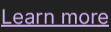
How do we know it's right? Lab 3 zooms into the bounds the tree reports for "Learn more", and the zoom shows exactly those words:
What the tree can't do
- Terminals (
foot, Omarchy's default) publish little or nothing. Agents use screenshots and zoom there. - Custom-drawn UIs (canvases, games, many Electron apps' custom widgets) may be a single opaque element.
- Names depend on the app's authors. An icon button nobody labelled has an empty name.
So the tree complements screenshots rather than replacing them. The MCP tool's description tells Claude both exist.
Check yourself
Q: Why does press work even when another window covers half the button?
Answer
It doesn't click. It asks the app over AT-SPI to run the element's own action, the same code path a screen reader uses. Pixels, the cursor and window stacking never come into it.
Q: A link's bounds are 25% too far right and down, but toolbar buttons are fine. What's wrong?
Answer
The web content is reported in device pixels and was treated as layout units. (At scale 1.25, device pixels are
1.25 times layout units.) That's the document web switch in _window_for.
Q: Why does the server need Hyprland to compute an element's position at all?
Answer
On Wayland, apps only know positions inside their own window. Only the compositor knows where each window is on
screen, so the server adds the window's origin from hyprctl clients.