Goal: build an X11 desktop by hand and see why it's so easy to automate (and to snoop on). Time: 5 minutes (1 minute of package installs). Chapter: How Linux draws a desktop.
bash./labs/05-x11/run.sh
A plain pod (no VM) with Xvfb, a VNC server, xterm/xclock/xeyes, and the same tools the agent computer's
computer server uses. The script opens macOS Screen Sharing (vnc://localhost:5901, password lab) so you can
watch everything happen live.
- Start Xvfb on
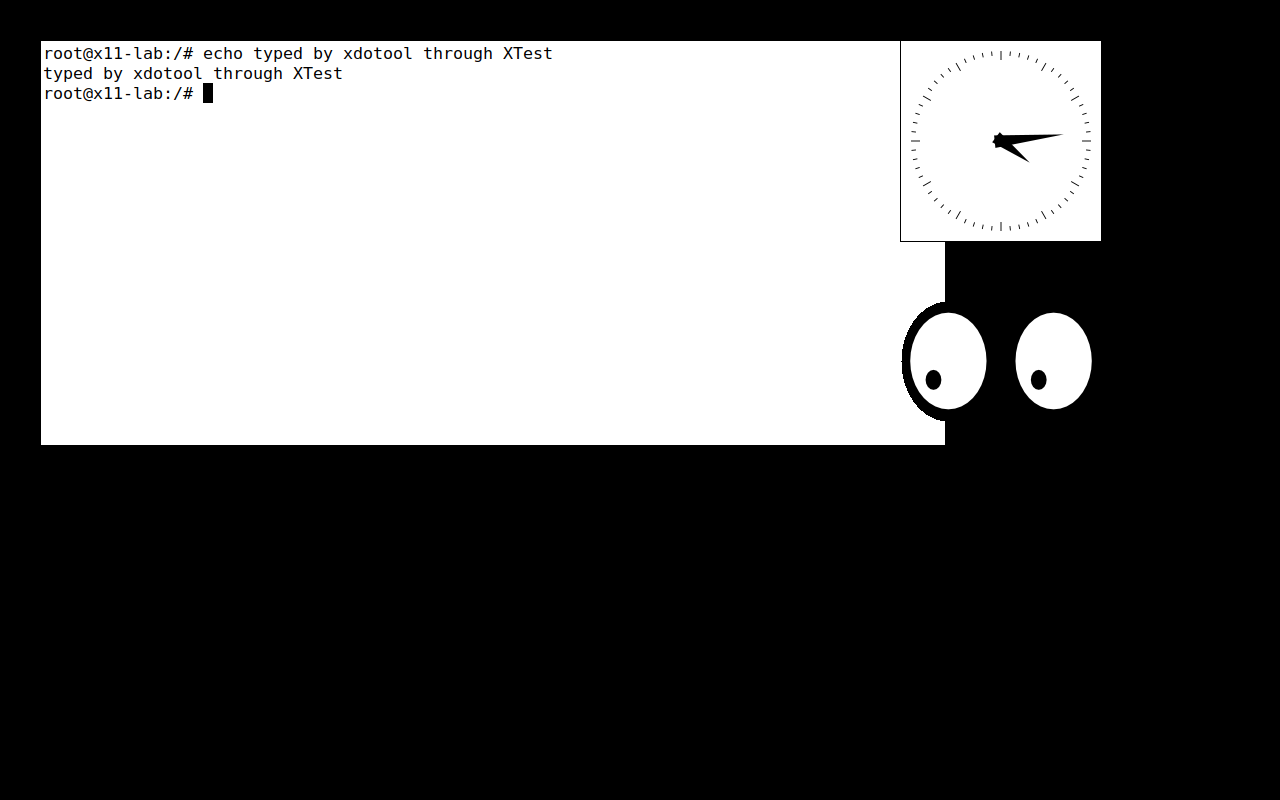
DISPLAY=:1: an X server with no monitor. Screen Sharing shows black. - Start three apps (clients).
xwininfolists the window tree. xdotoolmoves the pointer (watchxeyes) and types into the xterm through XTest.- Take a screenshot of the whole screen: any client can.
- Watch every keystroke with
xinput test-xi2 --rootwhilexdotooltypes "secret".
What it looks like
Questions
Q: Why did xdotool windowactivate fail in an early version of this lab, and how does the lab type into the xterm now?
Answer
Activating a window is a window-manager feature (_NET_ACTIVE_WINDOW), and a bare Xvfb has no window manager. Without one, X sends keystrokes to the window under the pointer, so the lab moves the mouse over the xterm first.
Q: The listener counted 12 raw key events for 'secret'. Why 12?
Answer
6 letters × (press + release). Any X client can subscribe to raw input for the whole display, which is how our takeover lock's input_watch.c notices a person using the desktop, and also how a keylogger would work.
Q: Selkies (the person) and xdotool (the agent) both inject input through XTest. Why is that a problem for the takeover lock?
Answer
The events look identical, so the lock can't tell who produced them by device. It uses timing instead: events while an agent command is running (plus 0.5 s) are the agent's, anything else is a human.
Expected output
📜 Expected output (a real run, captured while building the lab)
== 1. Start the lab pod (Ubuntu + X11 tools; installing packages takes ~1 minute)
$ kubectl apply -f x11-lab.yaml
pod/x11-lab created
......... ready

== 2. Start an X server with no monitor: Xvfb draws into memory. DISPLAY=:1 is its address.
$ X 'xdpyinfo | grep -E "name of display|dimensions"'
name of display:    :1
  dimensions:    1280x800 pixels (325x203 millimeters)

== 3. Watch it: start a VNC server on the display and connect from your Mac
   Open Screen Sharing: run   open vnc://localhost:5901   (password: lab)
   It's black: an X server with no apps and no window manager is just an empty framebuffer.

== 4. Apps are clients: start a terminal, a clock and eyes that follow the mouse
$ X 'xwininfo -root -children | grep -E "xterm|xclock|xeyes"'
     0x100000a "xeyes": ("xeyes" "XEyes")  200x120+900+300  +900+300
     0xe0000c "xclock": ("xclock" "XClock")  200x200+900+40  +900+40
     0xc0000c "root@x11-lab: /": ("xterm" "XTerm")  904x404+40+40  +40+40
   xwininfo lists the window tree, a bit like document.body.children in the DOM.

== 5. Inject input through XTest, the way xdotool (our agent) and Selkies (you, in the browser) both do
$ X 'xdotool mousemove 300 200 && xdotool getmouselocation'
x:300 y:200 screen:0 window:0
   Watch xeyes look at the pointer.
$ X 'xdotool mousemove 400 200 && xdotool type --delay 60 "echo typed by xdotool through XTest" && xdotool key Return'
   Watch the xterm: the keys were injected, no keyboard involved. With no window manager running, X sends
   keystrokes to whatever window is under the pointer, which is why we moved the mouse over the xterm first.

== 6. Any client can read the whole screen (this is what the agent's screenshot command does)
$ X 'import -window root /tmp/screen.png' && kubectl cp lab/x11-lab:/tmp/screen.png /tmp/x11-lab-screen.png >/dev/null && echo saved /tmp/x11-lab-screen.png
saved /tmp/x11-lab-screen.png

== 7. Any client can watch every input event, system-wide (XInput2 raw events, like our input_watch.c)
   Listening to every input event while xdotool types "secret" into the xterm...
$ kubectl exec -n lab x11-lab -- sh -c 'grep -cE "EVENT type (13|14) " /tmp/events.txt | sed "s/^/raw key events seen: /"'
raw key events seen: 12
   13/14 = RawKeyPress/RawKeyRelease. A keylogger is 5 lines of X11 code. Wayland was designed to make this
   impossible for ordinary apps, which is why Omarchy needs compositor-specific tools instead (Lab 6).

== 8. Clean up
$ kubectl delete pod x11-lab -n lab --wait=false
pod "x11-lab" deleted
Try next
- Run
DISPLAY=:1 xdotool key ctrl+c(viakubectl exec) while the xterm runssleep 100. - Start
xfwm4ortwm(install it) and re-run step 3 withxdotool windowactivate: it works once there's a window manager.